Vampire Maker
Vampire Maker
Game by:
Doll Divine Dress Up Games
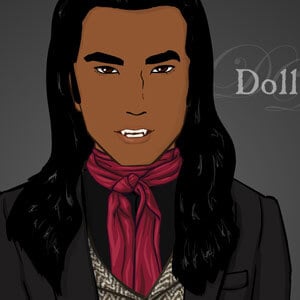
Create the handsome vampire of your dreams, or the frightening vampire of your nightmares! This game was heavily inspired by one of my favourite movies, Interview with the Vampire. I haven't read the book but one day I do hope to! As such, it has a large selection of fancy Victorian era clothing, including tweed coats, long rain coats, vests and ascots. There are also many long male hair styles as well as short. But it includes modern clothing as well to re-create your Twilight fan fiction male vampire characters. This was the first dress up game where I experimented with letting the player customize the head shape! I was also very experimental with the menu which I now see is a bit frustrating to use hahaha but the candle flicker sure is pretty XD If the song sounds familiar, it's because it was sampled by the Wu-Tang clan on the song "Gravel Pit". This is the original, the theme to the 60's French TV mini-series Belphégor, composed by Antoine Duhamel.
Tags:
Comments:
Popular Tags:
animals
anime
avatar makers
azaleasdolls
character creator
couples
disney princess
dragons
elequinoa
fairies
fantasy
fashion
girl games
gothic
harry potter
historical
LGBTQIA+
lolita
male
meiker
mermaids
my little pony
picrew
princess
rinmaru
royalty
sailor moon
scene maker
star wars
superheroes
traditional dress
vampires
victorian
wedding
see all...


About |
FAQ |
Privacy Policy |
Rules |
Webmasters
App Store | Google Play
Make Your Own Dress Up Game!
How to run Flash Player on desktop
© Doll Divine - Established 2002
App Store | Google Play
Make Your Own Dress Up Game!
How to run Flash Player on desktop
© Doll Divine - Established 2002
[linguise]